Friday, January 30, 2026

Record audio, video, and screencasts directly in Google Classroom

 Big news for the "Stream": You no longer need three different browser extensions just to send a video message to your students. Google Classroom has officially launched integrated audio, video, and screencast recording.

πŸ“½️ Where you’ll see the "Record" button:

  • Private Comments: Give your typing fingers a break. Record a quick voice note or screencast to walk a student through a tough math problem or provide pronunciation tips.

  • Announcements: Start the week with a 30-second video to build rapport and set the tone.

  • Assignments: Instead of a wall of text, record your instructions. It’s a game-changer for accessibility and ensures nothing gets lost in translation.

  • Student Submissions: Students can now "show what they know" through video or audio, providing a lifeline for those who struggle with written output.

The Bottom Line: This isn't just a new button; it’s a way to make digital learning feel more human. It saves you time on grading and gives your students a clearer path to success.

More information here: https://workspaceupdates.googleblog.com/2026/01/record-screencasts-audio-video-classroom.html 


Wednesday, January 28, 2026

GEMINI Integration with NOTEBOOK LM

Notebook LM is powered by the Gemini AI Model.  Notebook acts as a walled garden, ensuring that any data you enter into it is processed accurately.  A new integration between Notebook LM and Gemini will allow you to add a Notebook from Notebook LM into a Gemini prompt.  

❗The WECDSB sanctions only the use of the board's version of GEMINI and NOTEBOOK LM and not the personal use version.


In Gemini you can click on the PLUS button and now add a NOTEBOOK LM file to be used along with other inputs such as Google Drive files, Code, Video, or other files.


Why would you want to add a Notebook LM Notebook to Gemini?  

Gemini and Notebook LM approach your prompt differently and are separate products.  This integration provides even more targeted power to the user.  

1. Drastic Reduction in "Hallucinations"

When you provide a specific file, you can instruct Gemini to answer only based on that source. This "grounding" ensures that the AI doesn't pull random facts from the internet, but instead sticks to the facts, figures, and nuances within your provided text.

2. Synthesis of Complex Research

NotebookLM is great for organizing notes, but Gemini is the master of creative synthesis. By bringing those files into Gemini, you can:

  • Cross-reference: Ask Gemini to compare your personal notes with real-time market trends or historical data from its own training.

  • Drafting: Turn your raw research snippets into polished essays, blog posts, or professional reports.

3. Advanced Multimodal Analysis

Gemini can "see" and "hear" in ways basic document readers can't. If your NotebookLM files include complex charts, handwritten notes, or diagrams, Gemini's multimodal capabilities allow it to:

4. Massive Context Window

Because you are using the Paid tier (Gemini 3 Flash), you have an extended conversation length. This means you can upload massive documents—entire books or technical manuals—and Gemini can maintain the "memory" of the beginning of the document while you discuss the end.


Monday, September 1, 2025

2025-2026 School Year Kickoff

 πŸ–Š️πŸ“–✏️πŸ“š New to Google Classroom


What’s changing

In 2023, we introduced a centralized view of Classroom analytics for teachers and education leaders. This analytics dashboard provides direct visibility into student performance and engagement in Google Classroom. Starting today, teachers can view this data via an “Analytics” tab on their class pages. 

In addition, teachers will be able to see relevant insights on the class analytics page that alert them on how students are progressing and where they may need additional support. Here are a few examples: 
  • 2 students haven't visited your class page in the last week 
  • 3 students' grades increased over 25% since last month
  • 1 student turned in over half their assignments late in the last monthclass analytics
Richer insights about student engagement with assignments will also be surfaced directly on the Classwork page. Specifically, teachers can see the number of students who haven’t opened Drive files attached to assignments in Classroom. They can then follow up by sending a quick reminder to the class or individual students through private comments. 
send a quick reminder to the class or individual students through private comments
This, along with our previously announced feature that displays the number of students who haven’t edited attachments, provides teachers with a more comprehensive view of how students are progressing on assignments and equips them with the tools to deliver timely reminders. 

Google announced numerous enhancements at ISTE this year. One particularly noteworthy addition that caught my attention was Quick Links in Google Classroom.

image.png
image.png


πŸ“†Google Booking Appointments

Following our recent announcement of the ability to share your Google Calendar appointment booking page directly in your email, we’re excited to introduce a new way to access all your booking pages directly in the Calendar sidebar. Plus, users who don’t have an appointment schedule yet will now have a pre-configured booking page. 

With this launch, users who haven’t set up an appointment schedule yet will see a pre-configured booking page entry in the Calendar sidebar, making scheduling one-on-one meetings with external users much easier. The pre-configured booking page is tailored to your working hours and will automatically update to prevent conflicts on your calendar.

image.png

πŸ’»  Google Meet 


Full screen for screen sharing


August 11, 2025, 11:02 am

What’s changing 

Starting today, the full screen action appears when viewing a presentation or sharing your screen. This option increases the size of the presentation by maximizing the Meet UI and reducing the size of meeting participants using sidebar view. 


Previous Announcements


Sunday, August 25, 2024

2024 School Year Kickoff


Welcome back to another school year!!
Please see below for updates on Google Classroom. 

Providing student engagement signals for Google Drive file attachments in Google Classroom:


With this update, teachers will have easily accessible visibility into whether students have made progress on assignments with Drive attachments through pre-existing workflows in Classroom. This helps identify students who may need additional support and make more informed decisions about how to assist their students. 

Click here for more information

Creating Groups in Google Classroom

Teachers can create groups in Google Classroom, which is convenient for issuing work to a group of students rather than the entire class. Now, teachers can differentiate content across sub-sections of their class based on their students' needs. For example, teachers can create groups based on reading levels, and as their class adapts, they can edit group members or delete groups within their class. 
Student groups in the Classroom

Sharing Google Classroom Resources

Teachers can share materials like assignments, lessons, etc.; the recipient will import and adapt them in their Classroom. 

For more updates on your favourite Google Workspace tools. Please subscribe to the Google Blog https://workspaceupdates.googleblog.com/ and fill out the following.


Google Workspace Updates


 Stay up to date with Google Workspace Updates! Click on the icon to visit the subject-specific blog. 


Tuesday, May 2, 2023

New to Google Classroom - Practice Sets!

 New to Google Classroom - Practice Sets!


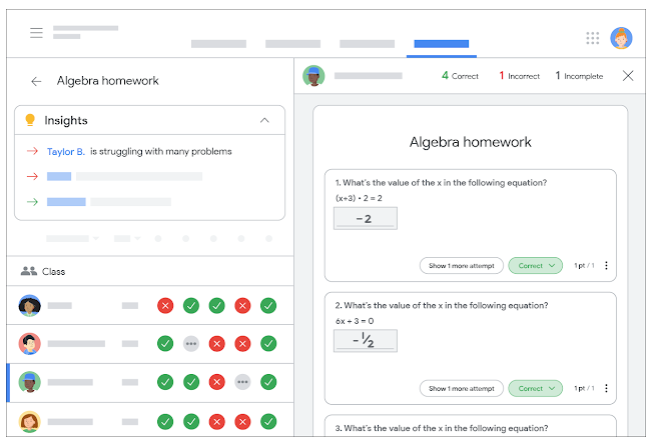
Google has recently announced a new and powerful tool that will be coming to Google Classroom, called 'Practice Sets'.  Practice sets can be given to students in the same fashion that homework is assigned.   Practice sets can be created using new or existing material.

The power behind practice sets is twofold, for the student's and the teacher's experiences.  Once the practice set has been created, Google's powerful artificial intelligence tools will review the practice set and find useful videos and concept cards that can help the student better understand the concepts being presented.  Upon the teacher's approval, these videos and concept cards can be embedded into the practice setting.  The 'auto grading' feature within practice sets will let the students know when they are correct and will provide the teacher-approved videos and concept cards where appropriate.  This will provide immediate feedback for the students as they are working through the practice set.


From the teacher's experience, practice sets provide an enhanced grading view which will show the class's performance and results of every attempt made by the students.  Furthermore, the AI tools will provide insights using classwide trends to inform teachers on what concepts the class or individual students may be struggling with.


Tuesday, April 18, 2023

5 minute assessment reviews: Triangulation


Hello again,
Today we are going to begin looking at how to triangulate your assessment, both by including observation, conversation and product in judging your students' mastery and by using three points of data guide your assessment.

The first video discusses using observation, conversation and product to assess our students.


The second video begins to look at using three points of data collection (that is three assessments) to both guide your teaching and also make your assessment more valid.  This video is assuming that the 3 points of data are all equally weighted an that the course, or the unit is scaffolded and one concept is built on another.  In a subject like English (my area), the assumption is that the entire course builds upon earlier concepts and understandings.  In a subject like science or math, each unit of study might build upon earlier concepts in the course or just the unit and be scaffolded in that way.


I hope that these ideas can open a conversation about how teachers use triangulation to make their assessments fair and reliable.

The next video will dig deeper into looking at most recent and most consistent marks and I will do an English teacher explanation of measure of central tendency.

Let's keep the conversation going.


Record audio, video, and screencasts directly in Google Classroom

 Big news for the "Stream": You no longer need three different browser extensions just to send a video message to your students. G...