Switch on Learning (description)

At the Windsor-Essex Catholic District School Board, we are Switching on Learning by integrating Google’s powerful ecosystem into every classroom. This blog is a dedicated space for sharing the ideas, methodologies, and digital tools that transform the modern educational experience. Our Digital Toolkit We empower educators and students by leveraging a robust, collaborative environment: Google Workspace for Education: Driving seamless collaboration through Docs, Drive, and Classroom. The Power of AI: Utilizing Gemini and integrated AI features to personalize learning and spark creativity. Data-Driven Assessment: Using MarkBook to track student growth with precision and transparency. The Process of Learning: Leveraging Revision History to emphasize growth, iteration, and the visible journey of a student's work. From interactive Chrome tools to digital storytelling, we aren't just using tech—we’re using it to bridge gaps, foster global collaboration, and future-proof our students' skills.

Combatting "Fake News": Helping Students Distinguish Between Fact and Fiction

There is so much information in the world that we must teach students to distinguish what is true information and what is false information.  EBSCO has a useful infographic to help you teach students to use critical thinking when choosing what to believe.

There is a link below the image to a .pdf that can be shared with students.


EBSCOhost for English Teachers, Language Arts Teachers, Literacy Teachers and Readers


Do you teach Literacy, English, Reading or Language Arts?  You you have children who are in school?  EBSCOhost has a number of databases that are perfect for Subject English or ELA students and teachers.  

The infographic below provides easy reference to the EBSCOhost databases available through the Student and Teacher portals at www.wecdsb.on.ca.

As always, there is a link below the infographic to a .pdf you can share or post in your classrooms.

Exploring Canadian Points of View (EBSCOhost database)


Looking for a way to develop critical thinking?  Looking to explore issues in Canadian news?  Looking to debate?  Canadian Points of View, a database available for free through EBSCO host, examines both sides of a variety of issues through a Canadian lens.  The video below will take you through the database in under 4 minutes and hopefully offer some inspiration for your teaching.


Google Meet Reactions

 Google Meet Reactions


Staff at the WECDSB will now have the option to use Google Reactions during a Google Meet.  This is a quick and easy way to convey reactions from a large number of participants.  For more information, visit:

Our Continuity of Education Site


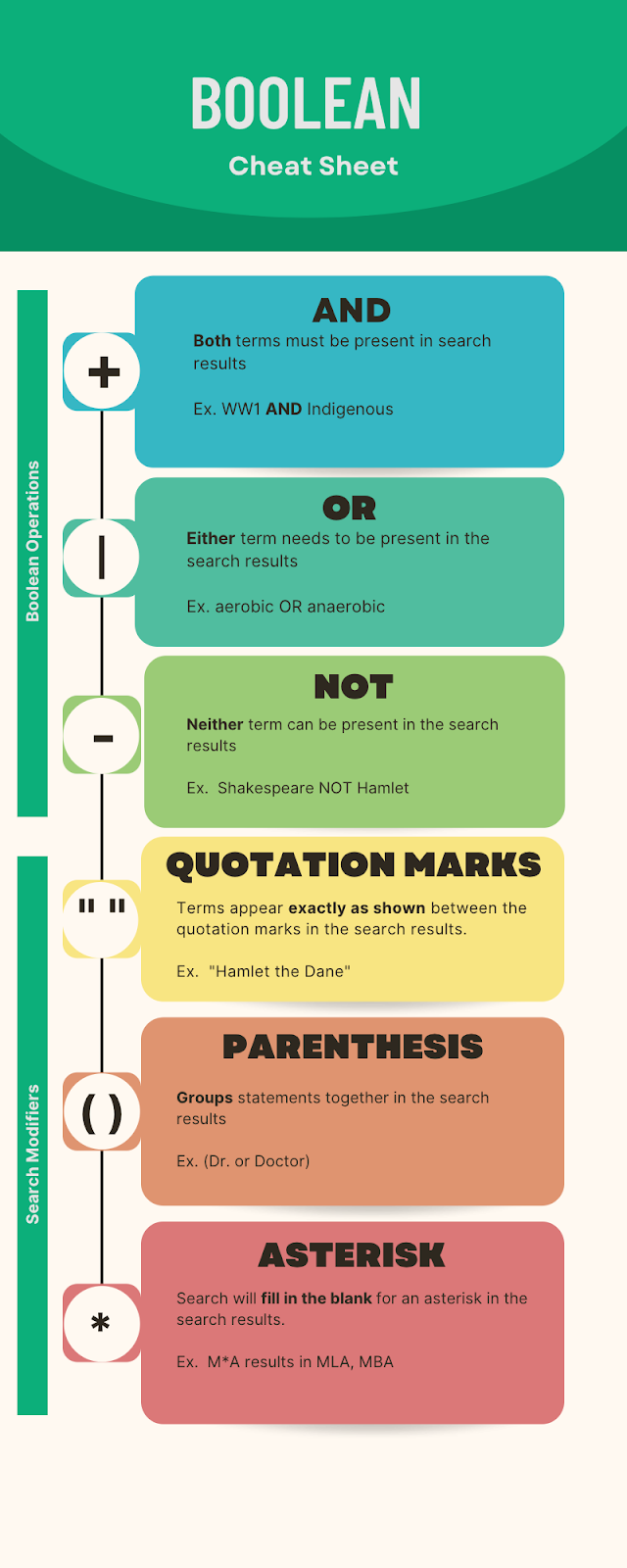
Using Boolean Operations and Search Modifiers for better research with EBSCOhost

 Boolean operators and search modifiers allow students to narrow their searches quickly.  Not only do these skills return better search results, they also save time so students are not sorting through thousands of results.  The cheat sheet below is also attached and you are free to post it in your google classrooms, print them for students or post in your classrooms.


Homework and Project Support for Elementary Students using EBSCOhost


EBSCOhost offers databases to help with homework and projects for Elementary students

EBSCO offers many resources for geared to Elementary school learners.  The infographic below describes the databases that might be useful for your Elementary students and parents.  A copy of the infographic is also linked below so you can share it with students and their parents or post it in your classrooms.

Students can access EBSCO through the student portal at www.wecdsb.on.ca

Exploring EBSCOhost databases

EBSCOhost databases

EBSCOhost offers free access to a number of databases.  Some are targeted at all users, some secondary and some elementary students.  You can assign a specific database to your students to use based on their age and grade level and/or based on the purpose for the database.  

Take a look at the infographic below for a description of some available databases and their uses.  There is also a link below so you can share the infographic with your students or post it in your classrooms.

Exploring EBSCOhost databases infographic .pdf

Here are a few quick videos about how to access EBSCOhost.

Accessing EBSCO as a student


Accessing EBSCO as a teacher


Instructional Videos for New Features: Revision History

WECDSB | Revision History Updates ↑ WECDSB Revision History Updates Short ins...