Switch on Learning (description)

At the Windsor-Essex Catholic District School Board, we are Switching on Learning by integrating Google’s powerful ecosystem into every classroom. This blog is a dedicated space for sharing the ideas, methodologies, and digital tools that transform the modern educational experience. Our Digital Toolkit We empower educators and students by leveraging a robust, collaborative environment: Google Workspace for Education: Driving seamless collaboration through Docs, Drive, and Classroom. The Power of AI: Utilizing Gemini and integrated AI features to personalize learning and spark creativity. Data-Driven Assessment: Using MarkBook to track student growth with precision and transparency. The Process of Learning: Leveraging Revision History to emphasize growth, iteration, and the visible journey of a student's work. From interactive Chrome tools to digital storytelling, we aren't just using tech—we’re using it to bridge gaps, foster global collaboration, and future-proof our students' skills.

Don't Have NOTEBOOK Software... that's ok!


Smart Notebook Express
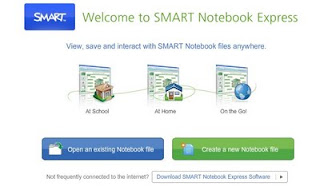
Similar to Powerpoint Viewer, SMART Notebook Express allows you to view, and interact with, all of the Notebook files for the Smart Board, without having the software.


There are basically 3 options:


Open an Existing Notebook file
* it opens most files created in Notebook software and maintains all of the features! (links, interactive objects, and even Flash objects)
Create a New Notebook file
* many of the features are not currently available, but this is likely to improve
Download the Notebook Express software
* this will allow you to use the software without an Internet connection

Take a look at: http://express.smarttech.com/

Math Open Reference

Technology in the Mathematics Classroom.
http://www.mathopenref.com/index.html
The Mission of the Math Open Reference Project is simple:
A free interactive math textbook on the web.
Using interactive tools and compelling animations, Math Open Reference provides an engaging way to learn and explore mathematics. Teachers will have new ways to teach, and the students a new way to learn that is fun and engaging.

Topics include: Plane Geometry, Coordinate Geometry, Solid Geometry, Trigonometry, Several Tools (Function explorer), Scientific calculator, and much more!

Great Extra: Step - by - step instructions for more than 30 different constructions


The Quadratic Function explorer (one of hundreds of interactive applets)

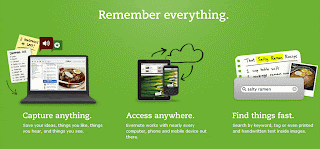
Make a note. Or 500,000 of them.

"Evernote is my most important tool for accessing all of what I need everyday... anywhere."
Kelly Power - Consultant - WECDSB


Visit http://www.evernote.com/about/home.php and start saving now!


SUMMING IT UP - Mathematics Newsletter


April Newsletter,

Please access the latest version of Summing It Up, a newsletter that serves the mathematics community of the WECDSB.

https://sites.google.com/a/wecdsb.on.ca/math-matters/newsletters

Please feel free to navigate around the rest of the site for useful resources and ideas.

W.E.C.D.S.B. Website is Multilingual!

The Windsor-Essex Catholic District school board website is now available in many different languages.  Simply click on the drop-down box at the top of the site and choose a new language.  Google offers a conversion tool that will convert all recognizable words and characters and convert it.


On the left is a copy of the site in French: 


The following languages are available:


The power of this technology does not end there.  Google Translate will you to translate virtually anything!

From the Google Translate website above teachers and students can paste work into the box and choose from over 50 langages to translate.

If you would like an entire website translated just past the link into the window and violla you will have the website translated for you:

Translated WECDSBIT BLOG:

English:

Italian:

Please try out Google Translate and return to this post and comment on the site and how you used it!

Google Translate is also available on theApple iOS and Andriod smartphones.  The app allow you to speak and capture your words and even read your text to you! 


The Ontario Educational Resource Bank


The OERB is a sharing site established by the Ministry of Education in 2008. It currently contains over 24 000 resources from K-12 contributed by Ontario teachers available for use today in your classroom. As well, the OERB has partnered with Learn 360 to provide access to over 8700 full-length videos and more than 25 000 video clips, all available for free download.

To access the OERB, please visit http://resources.elearningontario.ca/
For Username and Password, please contact Joe Sisco (joe_sisco@wecdsb.on.ca)


The images are available as posters that you may print for your classroom at: OERB Posters


Getting Tech Information Just Got Easier!

A new feature is available on the WECDSB IT Blog - Don't Fight Tech, Use the Right Tech.  Viewers can now sign up and receive updates in their email! Simply enter your email address into the box like the one to the right. A confirmation email will appear in your mailbox.  You must click on the link located in the email before this service is active.

Mobile Access:

If you access the WECDSB IT blog on your mobile phone the blog will automatically be reformatted for optimal viewing!


Check out the sample to the left.


Another way to access blogs or other websites is to use RSS. RSS stands for Really Simple Syndication. This is a group of web feed formats that allow for frequent updating. Most major websites will host RSS feeds and usually use the symbol on the left to advertise that fact.

Rather than visit individual websites that are flush with advertising and other links designed to attract your attention you can reverse the process and have the information from those sites come to you.
RSS content can be read by software called a "RSS reader", "feed reader" or "aggregator". The user can choose what feeds or websites they would like to track and all the newest information will be brought into the reader and notify the user. You can search the latest content of an unlimited amount of websites in one place. Most Browsers incorporate an RSS reader. Google offers an excellent reader called GOOGLE READER. 


For a FAST SIMPLE Demonstration View the video below:


Instructional Videos for New Features: Revision History

WECDSB | Revision History Updates ↑ WECDSB Revision History Updates Short ins...