Switch on Learning (description)

At the Windsor-Essex Catholic District School Board, we are Switching on Learning by integrating Google’s powerful ecosystem into every classroom. This blog is a dedicated space for sharing the ideas, methodologies, and digital tools that transform the modern educational experience. Our Digital Toolkit We empower educators and students by leveraging a robust, collaborative environment: Google Workspace for Education: Driving seamless collaboration through Docs, Drive, and Classroom. The Power of AI: Utilizing Gemini and integrated AI features to personalize learning and spark creativity. Data-Driven Assessment: Using MarkBook to track student growth with precision and transparency. The Process of Learning: Leveraging Revision History to emphasize growth, iteration, and the visible journey of a student's work. From interactive Chrome tools to digital storytelling, we aren't just using tech—we’re using it to bridge gaps, foster global collaboration, and future-proof our students' skills.

Don't Have NOTEBOOK Software... that's ok!


Smart Notebook Express
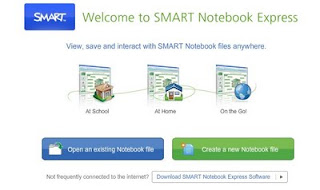
Similar to Powerpoint Viewer, SMART Notebook Express allows you to view, and interact with, all of the Notebook files for the Smart Board, without having the software.


There are basically 3 options:


Open an Existing Notebook file
* it opens most files created in Notebook software and maintains all of the features! (links, interactive objects, and even Flash objects)
Create a New Notebook file
* many of the features are not currently available, but this is likely to improve
Download the Notebook Express software
* this will allow you to use the software without an Internet connection

Take a look at: http://express.smarttech.com/

No comments:

Instructional Videos for New Features: Revision History

WECDSB | Revision History Updates ↑ WECDSB Revision History Updates Short ins...