View more presentations from joe_sisco.
The Future of Ebooks
 For the most part, right now, Ebooks are nothing more than glorified pdfs. Sure you get fancy interfaces that make it look like you are turning pages and you can do things like highlight text. But things like that you can do with regular books. However, some Ebooks are really trying to embrace the medium. Take for example the book Our Choice by Al Gore. Sure you might be a little tired of hearing that southern drawl tell us how we are wrecking the planet but this book on a tablet is much more than that. It's visual, interactive, includes multimedia and exploits the interface of the device its being read on. In fact, its not really called an Ebook but called an App. Check out the promo:
And the walk through of the features:
Can you Survive a Jump from a Building?
Ok, so the title is a bit of a misnomer. It actually is the title of an article on wired.com where the writer analyzes a viral video to show that it must have been fake. But the software they used was a free package called Tracker. Tracker allows you to analyze motion in video with mathematical tools. Tracker comes in online, Windows, Mac or Linux versions and is quite powerful. Here's how easy it is to track data while in the program:
Once you have the data in, then you can do a bit of analysis on it: Tracker pt2 analyzing
That is just a little bit of what you can do with the software. Good luck and have fun "Tracking"
Once you have the data in, then you can do a bit of analysis on it: Tracker pt2 analyzing
That is just a little bit of what you can do with the software. Good luck and have fun "Tracking"
Sharing has become even easier...
At some point in our educational lives, we have all enjoyed a great Math class (or suffered through one!)...
maybe English was your favourite subject?
We have created a document and are asking you to share what you think.
Please add a comment in the table about one or all of the subjects.
You may access this document at
Are you thinking, "I could do that with my class."?
We hope this may inspire you to start using Google Docs.
 GOOGLE Docs is online sharing site that has improved upon an already excellent product.

Upload your files from your desktop: It's easy to get started and it's free!
Access anywhere: Edit and view your docs from any computer or smart phone.
Share your work: Real-time collaboration means work gets done more quickly.
Check out what is new, as of today, at http://www.google.com/google-d-s/whatsnew.html
Citation Builder - Easy Online MLA or APA Format Assistance
 |
| Click for source of image |
Citing your work is very important. Citing your work properly is even more important. Thanks to my colleague Karen Kasic, I found out about this great website that can assist students to cite properly in either MLA or APA format.
The site can be located at the following link: OERB You must be logged in to the OERB for this link to work. Instructions are below. The OERB or Ontario Educational Resource Bank is available to Ministry of Ontario Students and Teachers. The best way for WECDSB teachers is to access the OERB through the Staff Portal:
Thanks to Urs Bill from e-learning Ontario you can find the citation builder here:
The link to the Citation Builder in this blog will only work if you are already logged into the OERB, and have clicked on the "Search" icon.
You can also find the Citation Builder resource (along with over 20 000 other resources in the OERB) by searching for it, either by typing in "Citation Builder" or by searching for it by it's ELO number, which is ELO1198120
You can also find the Citation Builder resource (along with over 20 000 other resources in the OERB) by searching for it, either by typing in "Citation Builder" or by searching for it by it's ELO number, which is ELO1198120


The site will give you the option of wether you would like the details about citing read to you or not.

Once the site demonstrates why you should cite materials and how you can build your own citations using MLA and APA for different media:

Students can easily fill out the online forms:

and then copy and paste the citation into their work.

Teachers have commented that one students use this resource a few times they eventually get the hang of it and just source their work on their own quicker. This is great evidence that this tool can support students to source correctly but not become a crutch.
Please feel free to comment below on your experience with the Citation Builder!
Learn360 - Multimedia Educational Resources

 OSAPAC has licensed the Learn360 video library for Ontario teachers to access. The multimedia library is composed of resources from TVO, Nelvana, PBS, National Geographic, Standard Deviants, Slim Goodbody, Sunburst Media, and others. Teachers and students have access thousands of educational videos, video clips, newsreels, audio and video files, and still images. All of the full-length videos and video clips are aligned to Provincial standards.
HOW TO ACCESS LEARN 360
 1) Access the OERB (Ontario Educational Resource Bank) through the STAFF PORTAL.
2) Click on the OERB Icon and
then choose the Search Icon.
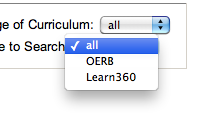
3) For this example search for "Combustion Engines"
Next Choose LEARN 360 in the Data Base to Search line.

4) A list of resources that matched your search will appear. Click on a video of your choice to view it.
Depending on how your computer is setup you may choose between Quick Time and Windows video formats
The video will appear in a browser player like the one below. Full Screen, and volume options are available.

Each video has information tabs below it containing an
overview, list of related segments, teacher resources,
provincial standards covered and citations.


Once in the system you can access the search menus on the left to continue your search for more videos.

Subscribe to:
Posts (Atom)
-
 You may have played the game Guess Who? as a kid. In it, each player was given a bank of 20 or so faces. You each had to choose one and then...
-
 Notebook LM is powered by the Gemini AI Model . Notebook acts as a walled garden , ensuring that any data you enter into it is processed ac...
-
WECDSB | Revision History Updates ↑ WECDSB Revision History Updates Short ins...